

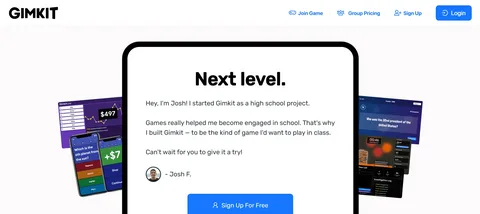
Gimkit is a game that combines learning with fun. Created by a high school student, the game has taken the educational world by storm. It’s an online platform designed to help students review and learn new material in a way that feels like a game rather than a boring task. In this guide, we’ll explore everything you need to know about Gimkit, how it works, and why it’s such a popular tool in classrooms around the world.
What is Gimkit?
Gimkit is an interactive, educational game where students can answer questions and earn rewards based on their performance. Unlike traditional classroom quizzes, Gimkit introduces a unique twist by allowing students to compete in real-time with their peers. Teachers can create custom quizzes or use ready-made kits to engage their students in a dynamic and competitive way.
The goal of Gimkit is to make learning enjoyable while reinforcing important concepts. Whether you’re studying math, history, or language arts, the game’s competitive nature encourages students to stay focused and active. It also allows teachers to track progress and provide targeted feedback.
How Does Gimkit Work?
At its core, Gimkit operates similarly to a trivia game. Students answer questions and earn money (in-game currency) for correct answers. This money can be used to purchase upgrades, power-ups, or even items that help them answer questions more efficiently. The better they perform, the more rewards they get, which keeps them motivated to learn.
Gamification of Learning
The beauty of Gimkit lies in its gamification features. Students don’t just take a test; they play a game. This method helps reduce the stress and anxiety that often come with traditional exams. As students compete, they are more focused on the game itself than the learning process. This subtle shift in focus leads to improved retention of knowledge.
Customization for Teachers
Teachers love Gimkit because it allows them to create tailored quizzes that align with the specific lessons or topics they are teaching. You can customize everything, from the difficulty level to the types of questions asked. Whether you’re reviewing vocabulary words or testing math formulas, Gimkit offers the flexibility to adapt to any curriculum.
Why Is Gimkit So Popular?
So, why is Gimkit getting so much attention in classrooms and educational circles? There are several reasons why students and teachers alike love using it:
1. Engaging and Interactive
Unlike traditional study methods, Gimkit keeps students engaged by incorporating competitive elements and rewards. Students work harder to earn the highest scores and achieve their best performance. The interaction also makes it more enjoyable compared to traditional worksheets or quizzes.
2. Easy to Use
Teachers and students find Gimkit easy to set up and play. Teachers can create their own kits in minutes, and students can jump into the game quickly without much instruction. The user interface is simple and intuitive, making it accessible to even younger students.
3. Real-Time Feedback
One of the standout features of Gimkit is the real-time feedback it offers. As students answer questions, they receive immediate feedback on whether their answers were correct or incorrect. This instant response helps students learn from their mistakes right away and reinforces the correct answers in their minds.
4. Versatile Learning Tool
Gimkit isn’t just for one subject or age group. It can be used for anything, from math problems to vocabulary quizzes. This versatility makes it a useful tool for teachers in various disciplines and grade levels. You can create kits for different topics and keep students engaged across different subjects.
5. Competition and Motivation
By turning learning into a game, Gimkit taps into students’ competitive nature. They can play individually or compete against their classmates. This friendly competition encourages them to perform better and keeps them motivated throughout the game.
How Teachers Can Use Gimkit in the Classroom
Teachers can integrate Gimkit in a variety of ways to enhance learning. Here are some ideas on how to use it effectively in the classroom:
1. Review Sessions
Before a big test or exam, teachers can use Gimkit to review key concepts with their students. The game provides an engaging way to go over important material while ensuring that students retain the information.
2. Homework Assignments
Rather than assigning traditional homework, teachers can set up Gimkit challenges that students can play at home. This allows students to review material in a fun and interactive way, making homework less of a chore.
3. Assessment Tool
Teachers can use Gimkit to assess students’ understanding of different topics. Since Gimkit allows for customizable quizzes, it’s a great way to gather data on how well students grasp the subject matter.
4. Group Challenges
To foster teamwork, teachers can organize group challenges where students collaborate to answer questions. This approach promotes teamwork and helps students learn from each other.
Gimkit vs. Other Educational Games
While Gimkit offers a unique combination of gaming and learning, it’s not the only educational game available. So, how does it compare to other popular tools like Kahoot or Quizlet?
Kahoot
Kahoot is another popular game-based learning platform that allows students to compete in real-time. However, Gimkit takes things a step further by adding the ability to earn money and purchase upgrades. This added layer of gamification gives Gimkit an edge in terms of keeping students engaged for longer periods.
Quizlet
Quizlet is a study tool that focuses on flashcards and quizzes. While it’s great for learning new material, Gimkit offers more interactive gameplay and competition. Gimkit also provides real-time feedback and the ability for students to earn rewards, which makes it more exciting.
Socrative
Socrative is a real-time student response system that lets teachers create quizzes and polls. While it’s a useful tool, it doesn’t have the same level of engagement and gamification that Gimkit offers. Gimkit’s competitive element and in-game rewards set it apart.
How to Get Started with Gimkit
Getting started with Gimkit is easy. Here’s how to sign up and begin using it in your classroom or with your students:
1. Create an Account
Visit the Gimkit website and sign up for a free account. Teachers can get started without any upfront costs, making it an excellent option for those on a budget. After signing up, you’ll have access to all the features and can start creating quizzes.
2. Create Your First Kit
Once you’re logged in, click on “Create a New Kit” and start adding your questions. You can customize the difficulty, topic, and question format. You can even import questions from other sources or use existing kits.
3. Invite Students
Once your kit is ready, you can invite your students to play. Students don’t need accounts to join, which makes it easy for everyone to participate. Simply share the game link with your students, and they can join in on the fun.
4. Track Progress
As students play, you can track their progress in real-time. The platform provides detailed reports that show how well each student is doing and which areas they may need help with.
FAQs About Gimkit
1. Is Gimkit free to use?
Yes, Gimkit offers both free and paid versions. The free version provides basic features, while the paid version includes additional tools like unlimited quizzes and advanced tracking.
2. Can students create their own kits?
Yes, students can create their own kits, but they need to have a teacher’s account to do so.
3. How do students earn money in Gimkit?
Students earn money by answering questions correctly. The more they answer correctly, the more money they earn. They can use this money to buy upgrades or power-ups.
4. Can I use Gimkit for homework?
Yes, teachers can assign Gimkit challenges as homework. Students can play the game from home to review material in a fun way.
5. Can I use Gimkit for any subject?
Absolutely! Gimkit can be used for any subject, from math and science to history and language arts.
6. How can I track student progress in Gimkit?
Gimkit provides real-time tracking for teachers. You can monitor student progress, see how many questions they’ve answered correctly, and identify areas for improvement.
7. How long does a typical Gimkit game last?
A typical Gimkit game lasts between 10 and 20 minutes, but it can be adjusted depending on the difficulty and number of questions.
8. Can Gimkit be used on mobile devices?
Yes, Gimkit is mobile-friendly and can be played on smartphones, tablets, and computers.
Conclusion: Why Gimkit Is Worth Trying
If you’re looking for an engaging and interactive way to help students learn and review material, Gimkit is an excellent choice. Its unique combination of learning and gamification makes it a fun and effective tool for both students and teachers. Whether you’re using it for homework, class review, or even group challenges, Gimkit offers endless possibilities for creating an enjoyable learning environment.
To dive deeper into the world of Gimkit and get started with your own kits, check out this detailed Gimkit Fun Learning Game Guide for more tips and tricks.